Chrome:
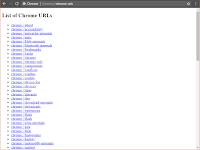
The list of hidden Chrome URLs can be opened by typing chrome://about or chrome://chrome-urls/ in the address bar. |
| Screenshot of Chrome all settings URLs |
Hardware:
In Computer cabinet,
Red light is a Hard drive seeking/
Green light is of running ON process of computer.
To clear recent items from jump list:
Open Run (win  + r),
+ r),
Type %AppData%\Microsoft\Windows\Recent\AutomaticDestinations
Delete files.
+ r),Type %AppData%\Microsoft\Windows\Recent\AutomaticDestinations
Delete files.
Add Startup file in Windows :
If you want to start a software or some notepad files as you ON the pc. then do as follows:
Open Run (win + r),
Type shell:startup
Open Run (win
+ r),Type shell:startup
In this folder, add whatever files or shortcut of apps you want to start.
Full shutdown PC:
Sometimes full shutdown of windows OS is required because if you want to open the drive in OS like linux then it cannot mount(open) it. Click Here for more.
Open cmd/PowerShell as Administrator (win + x),
Type shutdown /s /f /t 0
Open cmd/PowerShell as Administrator (win
+ x),Type shutdown /s /f /t 0
Want to back old Windows Photo Viewer in Windows 10 ?:
There is a tweak and with that you can bring back your old Windows Photo Viewer software in windows 10 that is replaced by Photos app.
Copy below code and paste in notepad. Then save it as PhotoViewer.reg.(AnyName.reg) Open by Double Clicking. Click Yes.
And So the software appears in "open with" in context menu of image format. (can also set as default)
Copy below code and paste in notepad. Then save it as PhotoViewer.reg.(AnyName.reg) Open by Double Clicking. Click Yes.
And So the software appears in "open with" in context menu of image format. (can also set as default)
WEI Performance Scan in Windows 10:
In early Windows editions like 7,8, there are index of performance already available in System Properties. (ex. 4.5. 3 rating)
But in Windows 10, it disappears. It can be seen in Ganes folder.(Run> shell:games) only when you have done the scan of performance.
But in Windows 10, it disappears. It can be seen in Ganes folder.(Run> shell:games) only when you have done the scan of performance.
Open cmd as administrator
Type winsat formal -v -xml c\winstats.xml
Done.
Now open shell:games in Run and you will see the results.
Can't Comment to a Blog:
Enable "third-party cookies" from Settings of Browser.
Remove Copy Protection from PDFs:
Open pdf, then click on Print and Select "Save as PDF" and Print. (Works only if the pdf is not print protected)